【学习】
2025年阅读清单
-
Github SpeedUp Tips
Github SpeedUp Tips
-
Markdown Tips
Markdown Tips
-
Oracle Flash Cache Hit Tips
Oracle Flash Cache Hit Tips
Database Smart Flash Cache
Ref:
Oracle Database 11g Release 2に関する10の重要なこと – askTom Live -
Point8: Flash Cache 【Database Smart Flash Cache】
現在のところフラッシュキャッシュはOracle Enterprise LinuxとSolaris版(SPARC/x64)のOracle Database Enterprise Editionのみで使える機能です。

また、Oracle Exadataに実装されているExadata Smart Flash Cacheと混同してしまう方がいるかもしれません。
ここで説明したフラッシュキャッシュ(Database Smart Flash Cache)は、Oracle Exadataのそれとはまったく別の、独立した機能です。データベース・サーバー上でバッファキャッシュとともに利用するもので、ストレージレベルの機能ではありません。
-
Oracle Import Error Hit Tips
Oracle Import Error Hit Tips
Export dumpfile from Oracle db 12.2 and import dumpfile to Oracle 12.1.
There was the following errors in import command.
ORA-39126: KUPW$WORKER.MOVE_DATA [TABLE_DATA:"XXX"."YYYYYYY"]
ORA-39096: METHOD
ORA-06512: "SYS.DBMS_SYS_ERROR"
ORA-06512: "SYS.KUPW$WORKER",
Command eg.
Export command:
expdp <user>/<password> SCHEMAS=<schema> DIRECTORY=<dir_dump> DUMPFIE=<dump_file> LOGFILE=<logfile_12.1.log> VERSION=12.1Import command:
impdp <user>/<password> SCHEMAS=<schema> EXCLUDE=USER DIRECTORY=<dir_dump> DUMPFILE=<dump_file> EXCLUDE=STATISTICS LOGFILE=<logfile_12.2.log>Reference:
Unable To Import Table Using DataPump Import (IMPDP) And Hitting ORA-39126 And ORA-39096 Errors (Doc ID 2193782.1)
To resolve the errors prior 12.2, apply Patch 20056333 and run post-installation step:

	1. Navigate to the <ORACLE_HOME>/OPatch directory:
	$ cd <ORACLE_HOME>/OPatch
	2. Install the SQL portion of the patch by running the following command:
	$ datapatch
Have a good work&life! 2020/03 via LinHong
-
Oracle 19c Poor Performance With DataPump Export
Oracle 19c Poor Performance With DataPump Tips
Reference
Poor Performance With DataPump Export On Large Databases (Doc ID 473423.1)
Data Pump Export Hanging In RAC At ESTIMATE Phase And Slow Performance (Doc ID 1948926.1)
-
Oracle Exadata Smart Flash Cache Tips
Oracle Exadata Smart Flash Cache Tips
Flash cache mode WriteThrough and WriteBack
The default flash cache mode is WriteThrough on X4 and earlier systems.
Since April 2017, Oracle Exadata Deployment Assistant (OEDA) enables Write-Back Flash Cache by default if the following conditions are met:
- GI and DB home must be 11.2.0.4.1 or higher 12.1.0.2 or higher 12.2.0.2 or higher AND
- DATA diskgroup has HIGH redundancy
From Exadata Storage Server release 11.2.3.2.0, Exadata Smart Flash Cache can operate either as a Write-through cache or a Write-back cache. Write-through mode is best suited for random repeated reads commonly found in OLTP applications. Write-back mode is best suited for write-intensive applications.
Write-Through -> first write to physical disks and then to flash cache for faster reads. Write-Back -> first write to flash cache and then to physical disk for both faster reads and writes.
-
Oracle 19c Wait event 'enq: KO - fast object checkpoint'
Oracle 19c Wait event ‘enq: KO - fast object checkpoint’
There were top event - ‘enq: KO - fast object checkpoint’ while I was doing awr report analysis, and found some test with it and some mos.
wait event: ‘enq: KO - fast object checkpoint’
From mos: Enq: KO - Fast Object Checkpoint Wait Event (Doc ID 2547319.1)
On reporting queries, there are too many "enq: KO - fast object checkpoint" wait event.

All reporting queries are doing full table scans concurrently. Oracle uses direct path reads instead of db file scattered reads. And direct path reads require a checkpoint

"_serial_direct_read"=NEVER
-
Oracle 19c load awr report
Oracle 19c load awr report
Tips:
Load data from datapump file created by awrload.sql.
Use awrextr.sql extract data from AWR into a datapump file.
Use same db version is good choise(the awr format are different from db versions.)
Need to check tablespace’s size while load awr data due to the limit of tablespace.
-
Oracle Recover Tips
Oracle Recover Tips
Tips:
1.Recover oracle password file
Wrong msg:
ERROR:
ORA-01017: invalid username/password; logon denied
Solution:
Use orapwd command to recover the password file.
orapwd file=$ORACLE_HOME/dbs/orapwORCL password=Welcome1 force=y // force=y (if the password file is existed, will replace the password file instead by force)
-
Oracle 19c Analysis SQL in AWR report Tips
Oracle 19c Analysis SQL in AWR report
There are some sql in SQL ordered by CPU Time AWR report.
These sql were using so many cpu time…
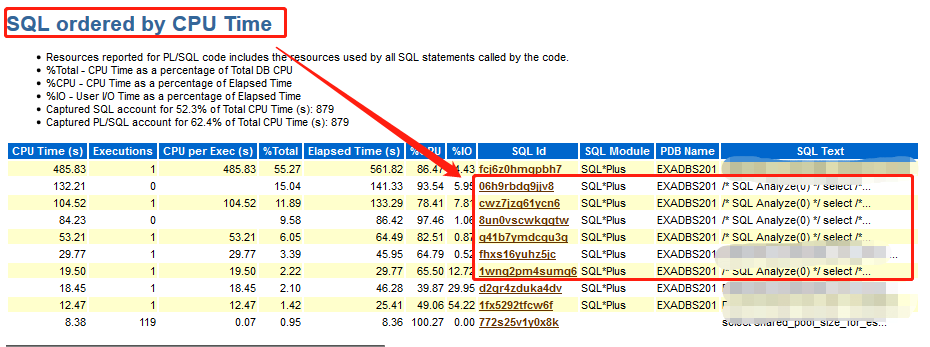
/* SQL Analyze(0) */ select /*+ full(t) parallel(t, 6) parallel_index(t, 6) dbms_stats cursor_sharing_exact use_weak_name_resl dynamic_sampling(0) no_monitoring xmlindex_sel_idx_tbl no_substrb_pad */to_char...What are these sqls? what are they doing?
-
Oracle 19c online statistics gathering Tips
Oracle 19c Online statistics gathering between sqlloader and insert append Tips
This is test with sqlloader/insert append sql.
-
Oracle SQL loader Tips
Oracle SQL loader Tips
- Oracle 26ai Auto Redo Prioritization Tips
- Oracle Private AI Services ContainerTips
- Oracle 26ai RPM Install Tips
- Oracle OCI Network Performance TestTips
- CPU Perf Sysbench Test Tips
- Oracle 26ai 23.26.1 OnP Install Tips
- Oracle 26ai 23.26.1 OnP Tips
- Oracle 26ai release from 2025/10/15 Tips
- Oracle redo generation's causes Tips
- Oracle 23ai Cell events Tips